
Vivaldi Browser
Screenshots


Vivaldi Browser gives you total control over your mobile web surfing experience. Many mobile browsers limit your options. However, Vivaldi Browser changes that approach completely. You can change the layout according to your personal preferences. Privacy stays protected by default without extra add-ons. Furthermore, the speed remains impressively fast during heavy usage. You do not need to settle for basic mobile tools. Instead, you can enjoy a fully customizable alternative on your phone. This introductory guide explores everything this unique tool offers.
Why You Need Vivaldi Browser for Superior Privacy
Privacy matters immensely when you browse the web today. For example, websites constantly try to track your online movements. Advertisers use these tracking scripts to build profiles about your personal behavior. Fortunately, Vivaldi Browser includes a powerful built-in tracker blocker. This feature stops malicious scripts from following you across different websites.
In addition, the browser features an integrated ad blocker. Ads often slow down your page loading speeds significantly. They also consume your precious mobile data allowance. Therefore, blocking ads makes your internet experience much faster. You can manage your privacy levels easily through the main settings menu. Users can choose to block nothing, block trackers only, or block both trackers and ads.
Furthermore, Vivaldi Browser does not track your online activities. The company does not collect your private browsing data. Your history, search queries, and downloaded items remain completely private. Consequently, you can explore the internet with peace of mind.
Customizing the Vivaldi Browser Interface Layout
Most mobile browsers force you to use one fixed layout style. On the contrary, Vivaldi Browser allows you to alter almost every visual element. You can move the address bar to the top of your mobile screen. Alternatively, you can position the address bar at the very bottom. Bottom placement makes one-handed typing much easier on larger smartphones.
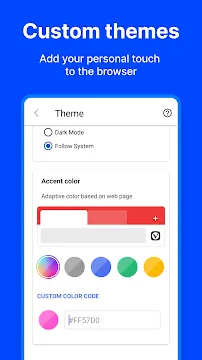
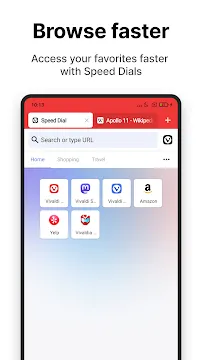
Then, you can customize the appearance of your main start page. This start page displays shortcuts called Speed Dials. You can organize these Speed Dials into custom folders for quick access. Users can also change the background theme of Vivaldi Browser. The theme can switch automatically based on system settings or specific schedules.
Moreover, you can toggle the visibility of the mobile status bar. This option gives you more screen space for reading long articles. You can also adjust the size of web text easily. Small adjustments can improve text readability quite significantly for many users.
Mastering Mobile Tabs with Vivaldi Browser
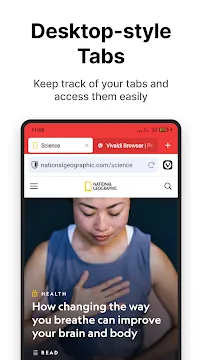
Managing multiple tabs on a mobile phone often feels quite chaotic. However, Vivaldi Browser introduces a real desktop-style tab bar to mobile screens. This feature sits neatly at the top of your current webpage. As a result, you can see all your open tabs clearly at a glance.
Switching between active tabs requires just a single tap on the screen. If you prefer more space, you can disable the tab bar anytime. Then, you can use the dedicated tab switcher button instead. This switcher displays your open tabs as large visual cards.
Furthermore, Vivaldi Browser provides a unique feature called two-level tab stacks. This option allows you to group related tabs together into distinct categories. For example, you can keep shopping tabs separate from work research tabs. This level of organization prevents clutter during intense research sessions. You can also view recently closed tabs in a special trash bin icon. Therefore, you will never lose an important webpage by accident again.
Integrated Productivity Tools for Smarter Browsing
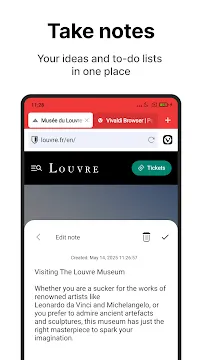
Vivaldi Browser contains several helpful tools built directly into its system. You do not need to download separate utilities to perform basic daily tasks. For instance, the browser features a fully functional note-taking tool. You can copy text directly from any website into a secure note. Then, you can add your own thoughts or reminders to that note.
Additionally, you can use the built-in screen capture feature. This tool allows you to take a screenshot of a visible area. Alternatively, you can capture an entire webpage from top to bottom. This long screenshot option proves highly useful for saving recipes or detailed articles.
The browser also includes a dedicated reading list feature. You can save interesting web articles to read later when you have free time. This list syncs across your devices automatically. Finally, an integrated language translator helps you read foreign websites easily. This translator keeps your data private because it runs on secure private servers.
Safe Data Synchronization Across Your Personal Devices
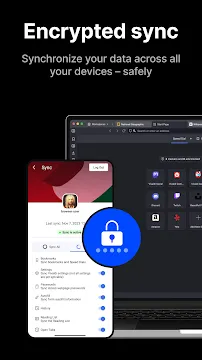
Keeping your data synchronized across multiple devices often raises serious security concerns. Fortunately, Vivaldi Browser uses end-to-end encryption to protect your information. This advanced encryption type ensures that nobody can read your data during transit. Not even the browser company can access your synchronized files.
You can safely sync several types of data between your phone and computer:
- Your saved bookmarks and custom folders.
- Your login credentials and secure passwords.
- Your open browser tabs and recent navigation history.
- Your typed notes and saved reading list items.
To start syncing, you simply need to create a secure Vivaldi account. Then, you log into the account on your other devices. The data transfers quickly and securely in the background. Because of this feature, you can leave your computer and continue browsing seamlessly on your mobile device.
Optimizing Speed and Performance Settings
Mobile browsing should always feel fast and responsive. Therefore, Vivaldi Browser provides specific settings to optimize performance on older mobile hardware. For instance, you can disable images entirely on webpages. This adjustment saves a massive amount of cellular data. It also forces text-heavy websites to load almost instantly.
In addition, you can clear your browsing data manually with a few taps. Removing cached files regularly frees up valuable internal storage space on your smartphone. Vivaldi Browser also handles heavy background processes very efficiently. The system suspends inactive tabs to conserve your device’s battery life.
Furthermore, the user interface remains smooth even with dozens of tabs open. This stability stems from excellent software engineering. Users can customize how web pages render on small screens. You can force a desktop view for websites that lack proper mobile design. Consequently, you always get the best layout for every site you visit.
Conclusion
Vivaldi Browser offers a refreshing alternative to standard mobile internet software. It respects user privacy by default. Additionally, it provides unprecedented layout control. You can manage your open tabs with maximum efficiency. The integrated tools eliminate the need for heavy third-party software extensions. Therefore, you save storage space and device memory. If you desire a secure, fast, and highly customizable browser, download Vivaldi Browser today. It changes how you interact with the mobile web.